Repair shop software, made by a repair shop.
Job ticket, status, point of sale and payment in one Dutch system for your repair shop. Built and used every day behind our own counter.
30 days free · no credit card · ends automatically
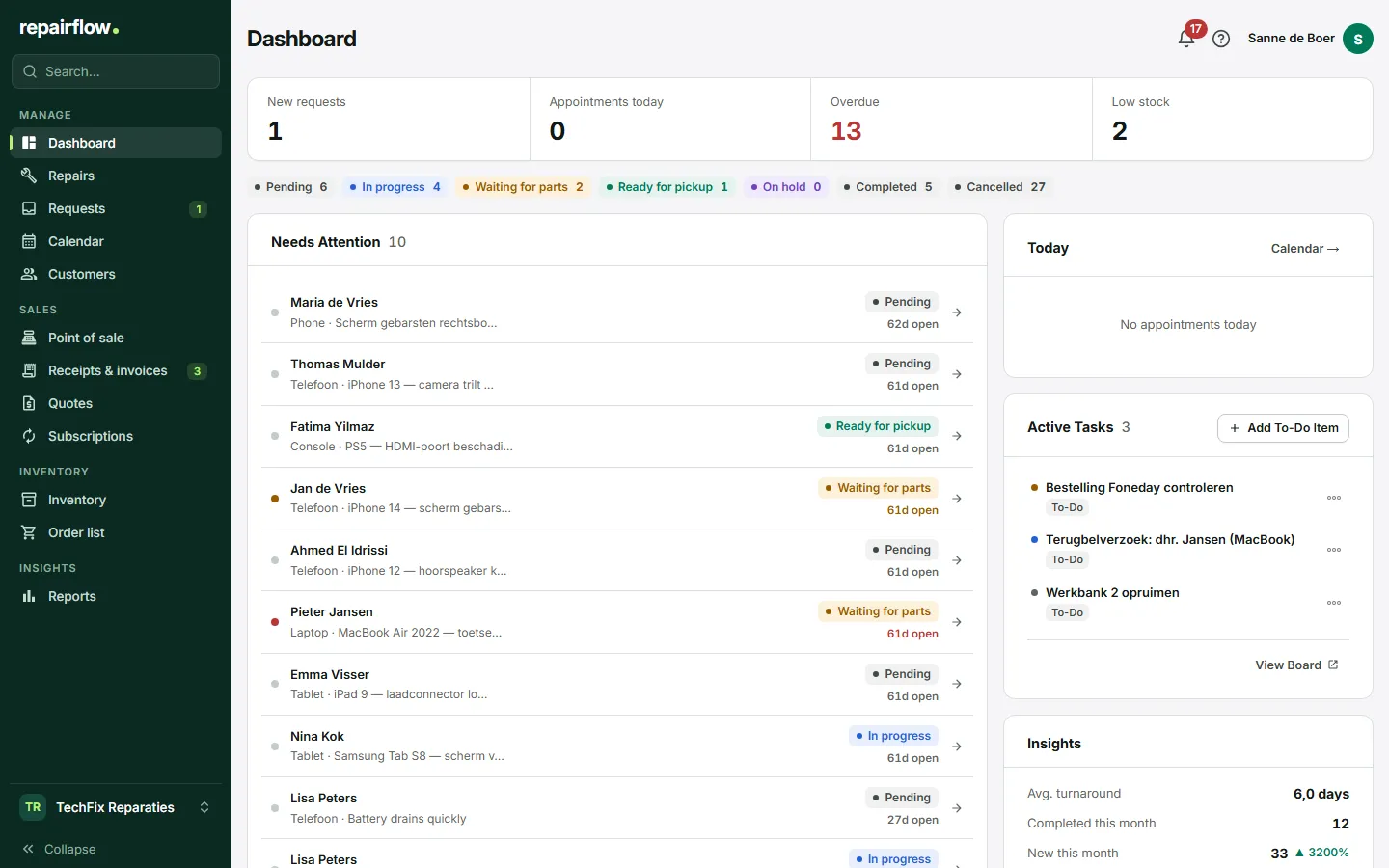
What is repair shop software?
Repair shop software keeps track of which devices are in your shop, whose they are, what is being done to them and what it costs. It replaces the paper job ticket, the repairs spreadsheet and the list next to the till.
Good repair shop software does more than keep records. The customer hears how things stand by themselves, the repair waits at the till with its cost lines and a part comes off the stock when you use it.
Repairflow is Dutch software, made by Alatas, a repair shop in Nederweert in the Netherlands. VAT, iDEAL, the Dutch collection costs act and the accountant are the starting point, not a translation afterwards.
For which shops
- Phone and tablet Screens, batteries and charging ports, with IMEI, passcode and parts from the wholesaler.
- Laptop and computer Longer repairs, quotes, deposits and business customers on account.
- Game console and electronics Any device with a brand, model and serial number that comes in over the counter.
One chain
From intake to payment
Every step uses what was recorded in the step before.
-
Intake
Customer, device, fault and price on one screen. The customer signs on the iPad or by email, and you print a label with a QR code.
View the feature: Intake -
Job ticket and parts
Notes, photos and parts from your stock on the repair. What runs out goes on the order list.
View the feature: Job ticket and parts -
Status
The board shows what is where. The customer gets status emails and follows the repair online.
View the feature: Status -
Point of sale
Scan the label and the repair is on the receipt, together with products and services.
View the feature: Point of sale -
Payment
Card, cash or an invoice with a payment link through your own Mollie. Reminders and the sales report come with it.
View the feature: Payment
What it looks like
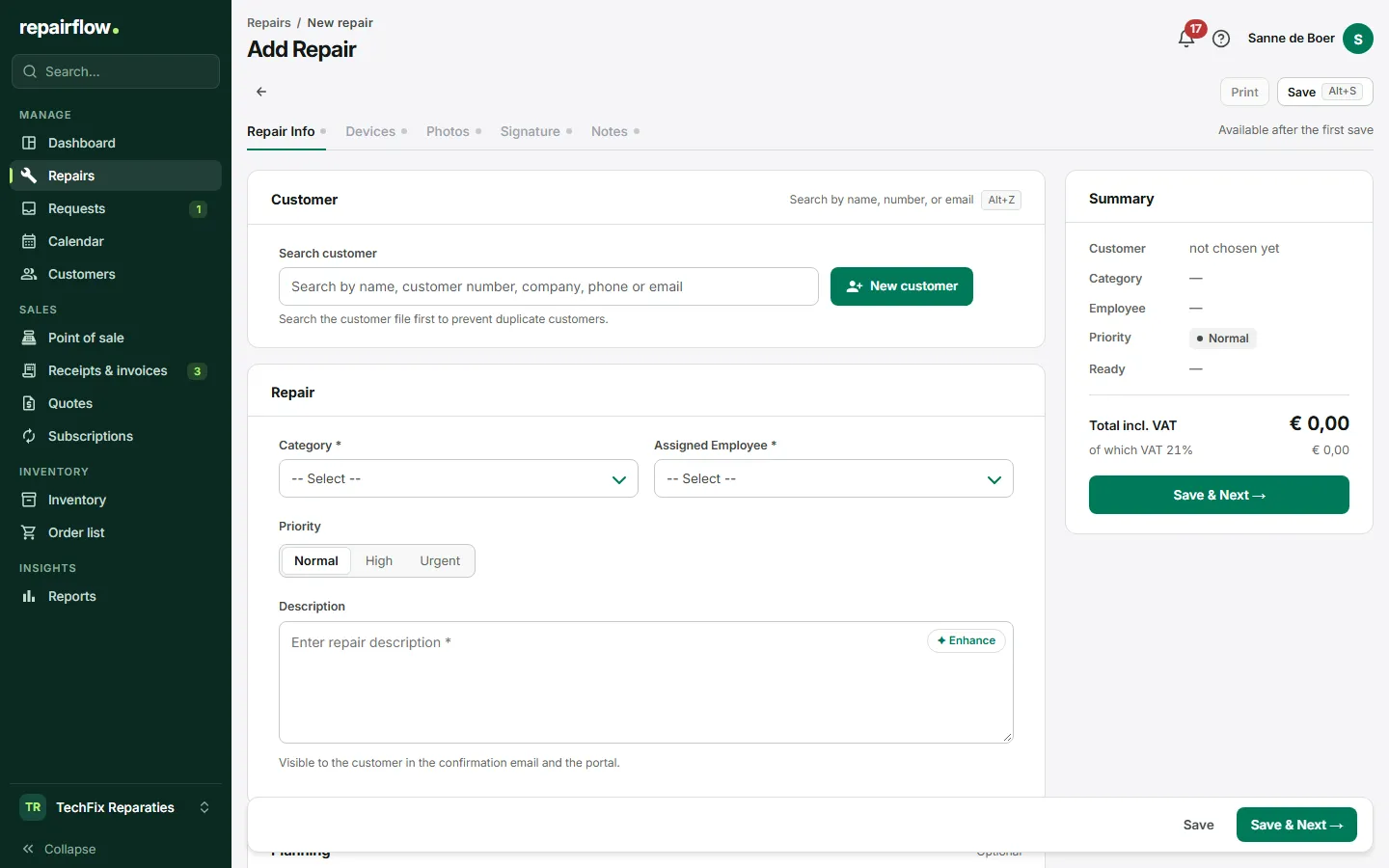
The intake
Find an existing customer by name, customer number or phone number, or create a new one in the same step. Devices, photos and the signature sit in tabs next to it.
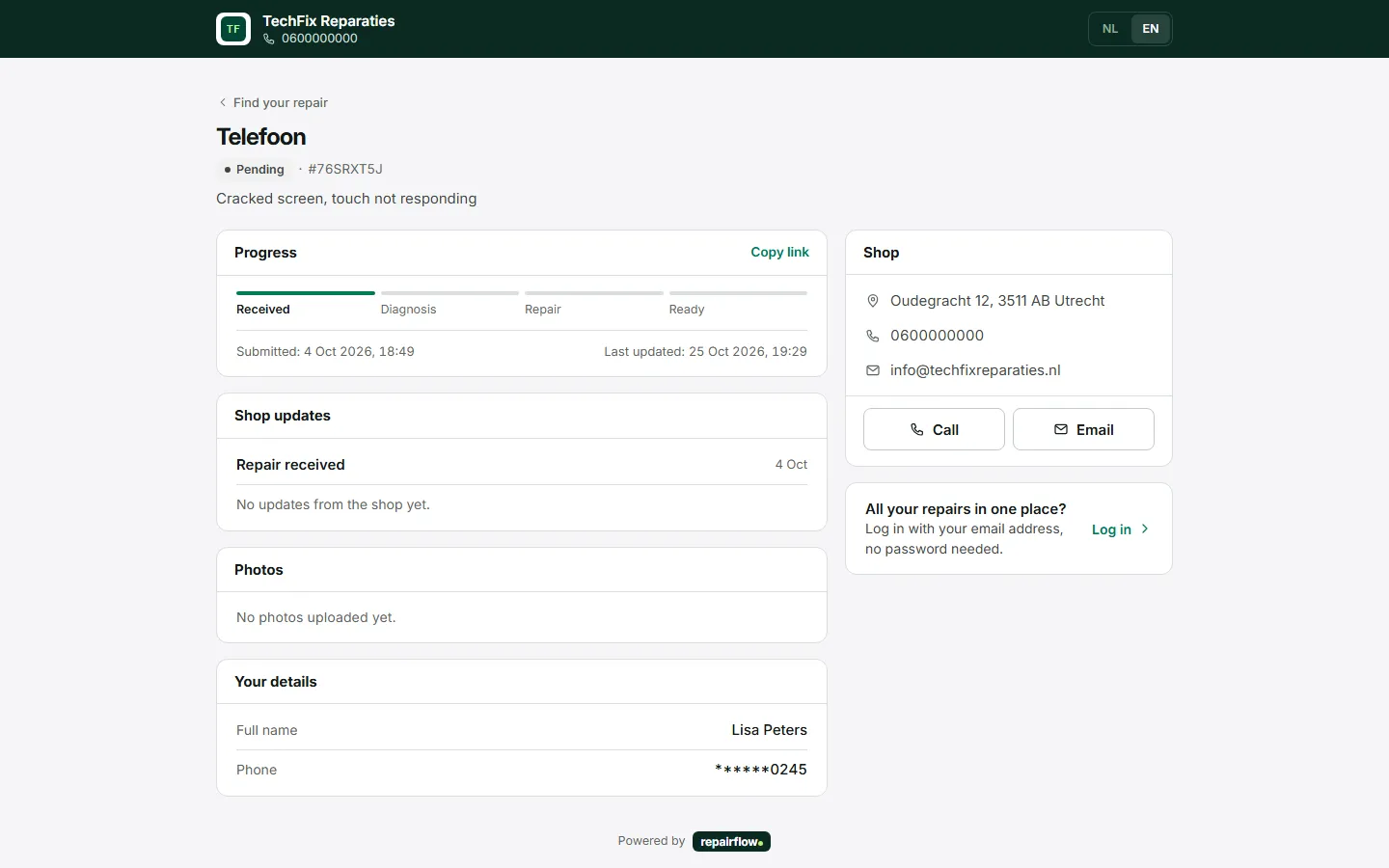
What the customer sees
With the reference number the customer follows the progress, sees your shop’s updates and calls or emails you with one tap.
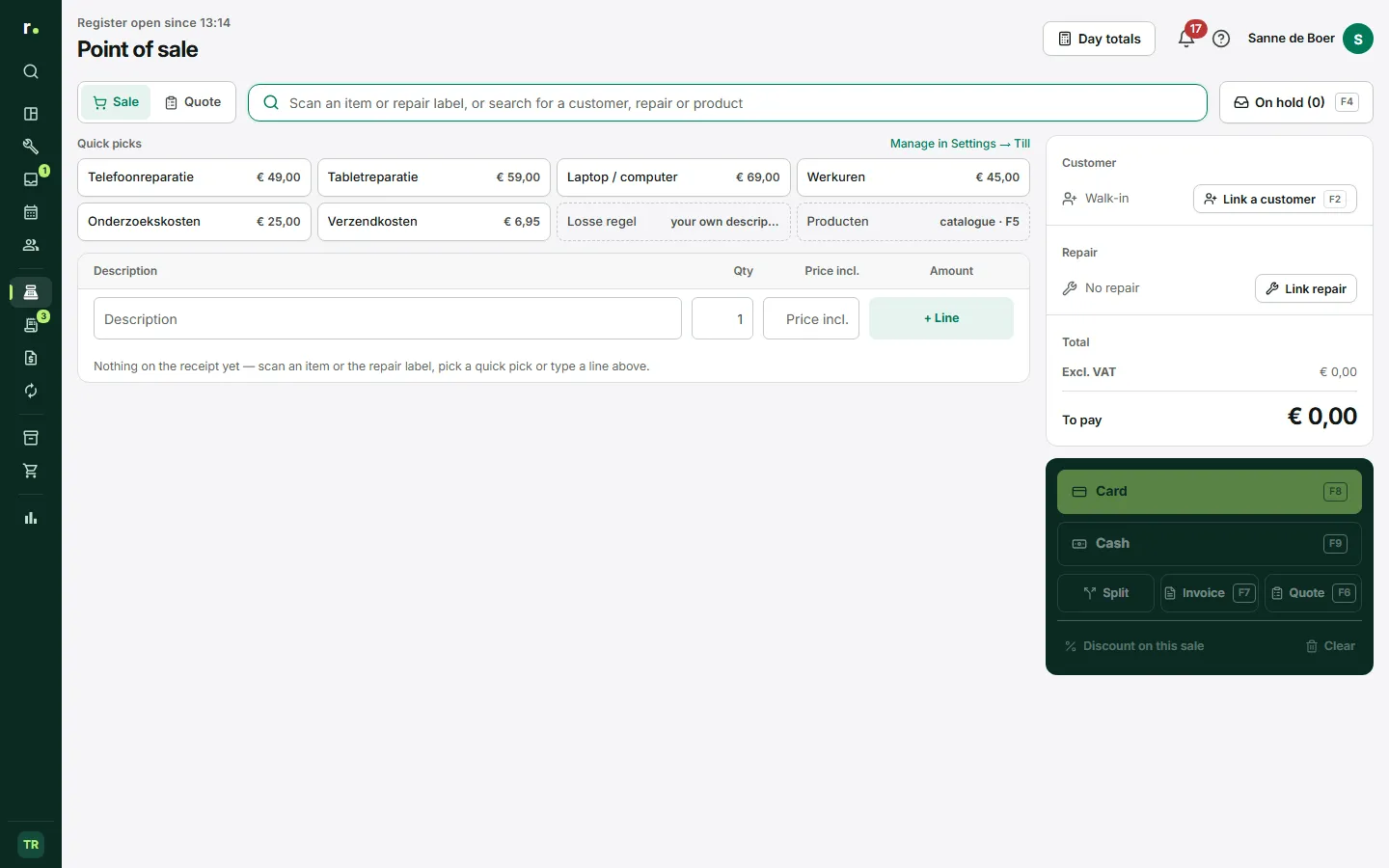
The point of sale
Repairs, products and quick picks on one receipt. Card settles straight away, cash rounds to five cents.
The six modules
-
Repairs
Every repair from intake to pickup, without loose notes.
-
Point of sale
Receipts, invoices and day totals from the same system as your repairs.
-
Customers
Every customer with their devices, repairs and invoices at hand.
-
Inventory
Parts in stock, on the repair and at the wholesaler, in one overview.
-
Invoicing
Subscriptions, reminders and a collection file, without an extra package.
-
Calendar
Appointments and repairs in one schedule, with a reminder for the customer.
What to look for when choosing repair shop software
Eight questions to hold any package against, with an honest account of what Repairflow does and does not do.
-
Is it made for the counter?
A repair shop is not a field service and not a warehouse. Repairflow is built around the device that comes in: intake, label, the iPad at the counter and collection at the till.
-
Are your receipts and invoices right?
VAT per rate, continuous numbering and a credit note in its own number series that refers to the original receipt. For a business customer the VAT and Chamber of Commerce numbers are on the invoice.
-
Do you get paid quickly?
An invoice goes out with a payment link and a QR code. The customer pays with iDEAL through your own Mollie account; the money goes straight to your bank account.
-
Can the customer follow along?
Status emails in your house style, a tracking page with the reference number and a customer portal without a password. That saves phone calls.
-
What about privacy?
Repairflow processes your customers’ data on your behalf. The database, photos and backups are in the European Union; only the AI button Improve and the help chat go, when you use them, through OpenAI in the US. A passcode never ends up in a log.
-
Is your data yours?
Download receipts, invoices, quotes and the sales report as PDF at any time, the report also as CSV. If you cancel, you request a full export.
-
Does it work in your language?
The app, the emails and your customers’ pages are in Dutch, and in English for those who want it.
-
What does it cost, and can you leave?
One subscription of € 49 a month excl. VAT, with every feature and unlimited staff. 30 days free, no credit card, cancel monthly.
Questions about repair shop software
What is repair shop software?
Software a repair shop uses to track which devices are in, for whom, what is done to them and what it costs. Repairflow links that to the point of sale, invoices, inventory and the customer, so you enter less twice.
Which shops is Repairflow suitable for?
Shops where the customer brings the device to the counter: phone, tablet, laptop, computer, game console and other electronics. Repairflow is not made for technicians who work at the customer’s home.
Is Repairflow Dutch software?
Yes. Repairflow is made by Alatas, a repair shop in Nederweert in the Netherlands, and used there every day. Support comes from people who use the app themselves.
Can I use Repairflow in English?
Yes. Every user chooses Dutch or English, and per shop you choose the language of the emails to your customers.
What does Repairflow cost?
€ 49 a month excl. VAT per shop, with every feature and unlimited staff. Try it free for 30 days, without a credit card, and cancel monthly.
Can I switch from my current system?
Yes. You enter your open repairs in an afternoon; we help move your customers and products. Email us before you start and we plan it together.
Try Repairflow free for 30 days.
No credit card, ends automatically. Switching takes an afternoon.